ユニバーサル基板エディタのPasS。
Windowsでは大変便利に使っていたが、Linux環境でも動かしたくなり、 その環境構築方法をメモする。
環境 
- PasS 1.5.2
- wine-11.17
- Linux 7.2.4-arch1-2
VB5が無い 
0128:err:module:import_dll Library MSVBVM50.DLL (which is needed by L"Z:\\home\\rei\\Downloads\\pass\\PasS.exe") not found
0128:err:module:loader_init Importing dlls for L"Z:\\home\\rei\\Downloads\\pass\\PasS.exe" failed, status c0000135
入れる。
winetricks --force vb5run
COM {612a8624-0fb3-11ce-8747-524153480004} が無い 
0128:err:ole:com_get_class_object class {612a8624-0fb3-11ce-8747-524153480004} not registered
0128:err:ole:com_get_class_object class {612a8624-0fb3-11ce-8747-524153480004} not registered
0128:err:ole:com_get_class_object no class object {612a8624-0fb3-11ce-8747-524153480004} could be created for context 0x3
0128:err:ole:com_get_class_object class {612a8624-0fb3-11ce-8747-524153480004} not registered
0128:err:ole:com_get_class_object class {612a8624-0fb3-11ce-8747-524153480004} not registered
0128:err:ole:com_get_class_object no class object {612a8624-0fb3-11ce-8747-524153480004} could be created for context 0x3
Windows Common Controls ActiveX Control DLL (comctl32.ocx) に内包されている。
入れる。
winetricks comctl32ocx
COM {f9043c85-f6f2-101a-a3c9-08002b2f49fb} が無い 
0228:err:ole:com_get_class_object class {f9043c85-f6f2-101a-a3c9-08002b2f49fb} not registered
0228:err:ole:com_get_class_object class {f9043c85-f6f2-101a-a3c9-08002b2f49fb} not registered
0228:err:ole:com_get_class_object no class object {f9043c85-f6f2-101a-a3c9-08002b2f49fb} could be created for context 0x3
0228:err:ole:com_get_class_object class {f9043c85-f6f2-101a-a3c9-08002b2f49fb} not registered
0228:err:ole:com_get_class_object class {f9043c85-f6f2-101a-a3c9-08002b2f49fb} not registered
0228:err:ole:com_get_class_object no class object {f9043c85-f6f2-101a-a3c9-08002b2f49fb} could be created for context 0x3
Microsoft Common Dialog Control 6.0 (comdlg32.ocx) に内包されている。
入れる。
winetricks comdlg32ocx
起動に成功するが、文字化けする 
system localeが、日本 (SHIFT_JIS) でない。
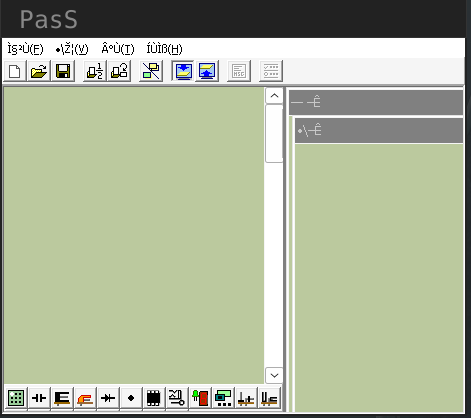
SHIFT_JISに、する。
export LOCPATH=$HOME/.wine/locale-ja/
mkdir -p $LOCPATH
localedef -f SHIFT_JIS -i ja_JP $LOCPATH/ja_JP.SJIS
LOCPATH=$HOME/.wine/locale-ja/ LANG=ja_JP.SJIS wine PasS.exe
フォントがない 
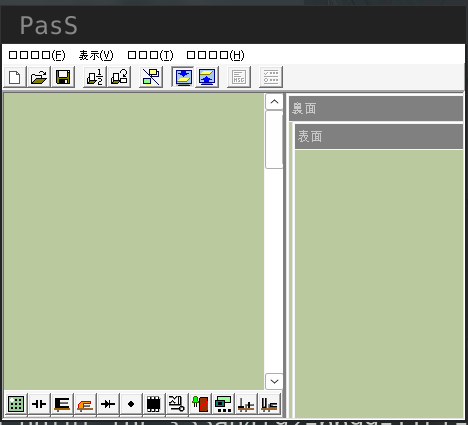
入れる。
winetricks cjkfonts
部品選択バーが1行はみ出している 
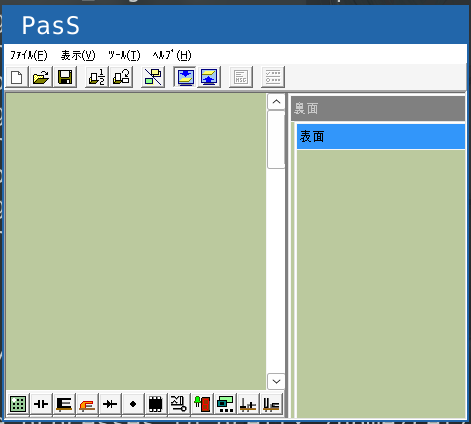
Win32 APIを用い、起動後、外からツールバーのサイズをいじり、問題を回避する。
専用ツール: yanorei32/pass-wine-fix
P.S. 一度PasSプロジェクトを作り、そのファイルを引数として渡すことによっても回避できる。
LOCPATH=$HOME/.wine/locale-ja/ LANG=ja_JP.SJIS wine PasS.exe project.pas
なぜ上記ツールでなおるのか、なぜ既存プロジェクトを引数から開く際には再現しないのか、は謎。
完璧に 
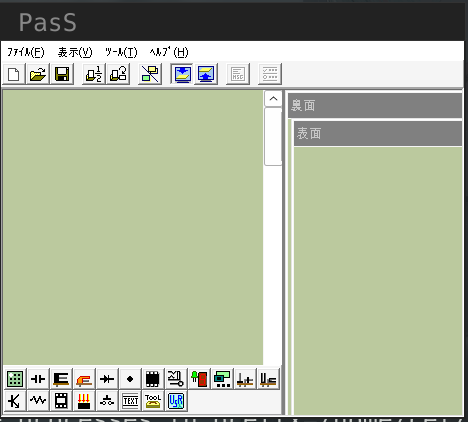
いい感じのシェルスクリプトを書く 
#!/bin/bash
set -eux
export PASS_DIR="/home/rei/.local/opt/PasS/"
export LOCPATH=$HOME/.wine/locale-ja/
export LANG=ja_JP.SJIS
bash -c "sleep 1.5; $PASS_DIR/pass-wine-fix.exe" &
$PASS_DIR/PasS.exe
完成。
macOSでも同様の症状が発生するらしい 
Sixty three |おお、こんな良い物(ユニバーサル基板エディタ)があったのかぁ〜
もしかしたら yanorei32/pass-wine-fix で回避できるかも…?